
What is the WhatsApp Groups API?
How do WhatsApp Business groups work?
Who can use it, and what are the limits?
5 ways businesses use WhatsApp groups
How does imBee make WhatsApp groups enterprise-ready?
WhatsApp Groups vs Broadcast vs 1:1: which should you use?
WhatsApp Groups API: frequently asked questions
For years the WhatsApp Business Platform handled two things well: one-to-one conversations and one-to-many broadcasts. What it could not do was group chat. That changed in 2026. The WhatsApp Groups API lets an approved business create, manage, and message small WhatsApp groups programmatically — and, with a platform like imBee, run them from the same inbox your team already uses for every other channel.
This guide explains, in plain English, what the Groups API is, who can use it, the limits that actually matter, five real business use cases, and how imBee turns the raw API into a governed, auditable workflow.
Key takeaways
Here is the feature at a glance:
| Detail | What to know |
|---|---|
| Members per group | Up to 8 |
| Groups per business number | Up to 10,000 |
| Who can use it | Any Official Business Account (OBA) |
| How members join | Invite link only (consent built in) |
| Pricing model | Per-message, charged per delivered recipient |
| Manage from | The imBee unified inbox |
New to the platform itself? Start with our explainer on the difference between the WhatsApp Business app, API and Platform.
A WhatsApp business group is not a free-for-all. Access is controlled, and the API gives a business clear, limited admin powers — which is exactly what makes groups safe to use at work.
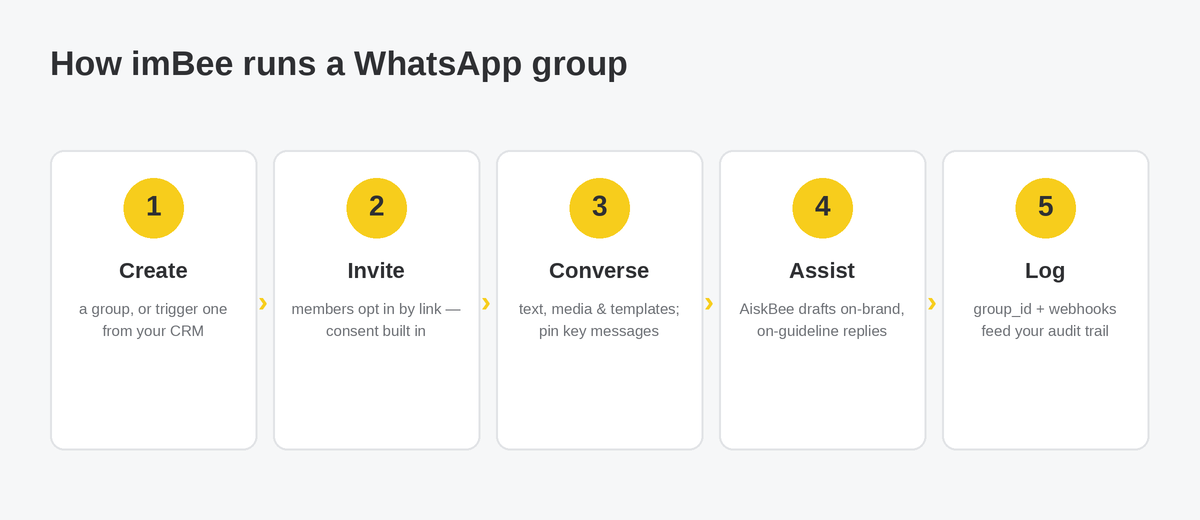
Joining is invite-only. Your system generates an invite link and shares it; the customer chooses to tap and join. There is no silent “add” — the person opts in, which gives you a clean consent record. You can also require admin approval of join requests for tighter control.
Admins get focused controls. Through the API a business can create and delete groups, get or reset the invite link, remove participants, update group settings, and pin up to three messages at a time (pin a fourth and the oldest unpins automatically). It is worth being precise here: the Groups API is not a full copy of the consumer app. It does not let you edit or delete other people’s messages, or hide the participant list. Design your flows around what the API actually supports.
Your systems stay in sync. Every message a group receives carries a group_id so you always know which room it belongs to, plus the sender’s identity. Webhooks notify your stack of lifecycle, participant, settings and status changes — the same event-driven backbone that powers the rest of the WhatsApp Cloud API.
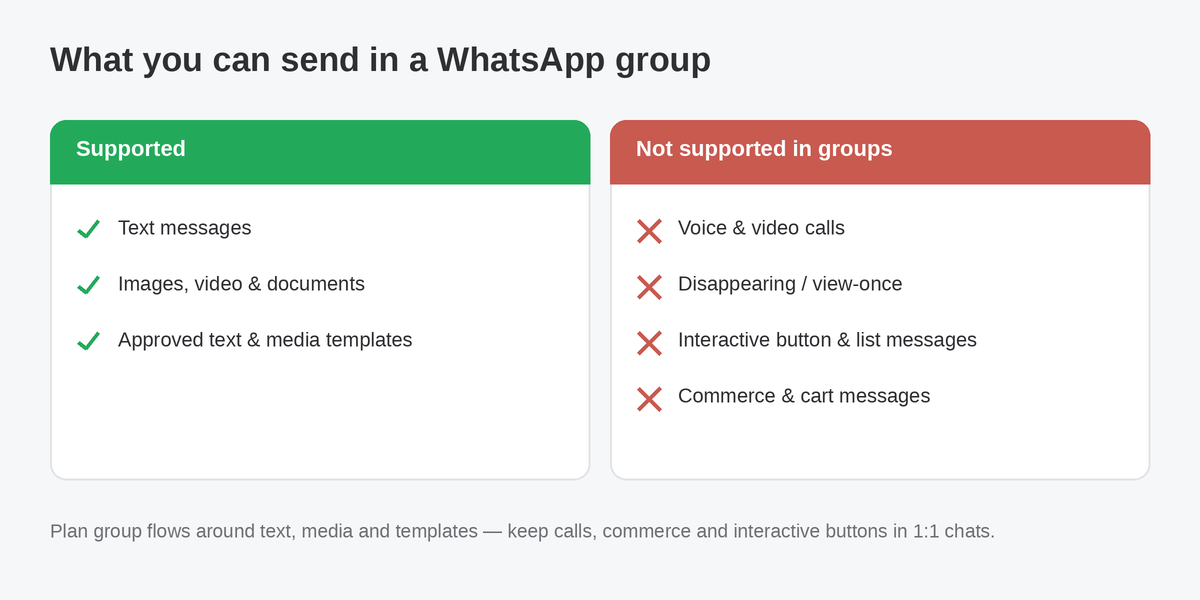
What groups do not do. Groups support text, media, and approved text and media templates. They do not support voice or video calls, disappearing or view-once messages, interactive button and list messages, or commerce and cart messages. If a flow depends on those, keep it in a one-to-one thread and use the group for coordination.
The eligibility rules for the Groups API are refreshingly short — and a popular myth is worth clearing up.
One real requirement. The Groups API is open to any business with an Official Business Account (OBA). It is not available on the consumer WhatsApp Business app, or for numbers onboarded to Multi-solution Conversations. If you already run the WhatsApp Business Platform through a provider like imBee, you are almost certainly eligible.
The myth to ignore. Several third-party guides claim you need “100,000 conversations in 24 hours” or a green verified badge to unlock groups. That requirement does not appear anywhere in Meta’s official documentation. Eligibility is an OBA — full stop. Do not let an inflated checklist talk you out of a feature you can already use.
The limits to design around. Each group holds up to 8 members. A business number can run up to 10,000 groups. Up to three messages can be pinned at once. These are not arbitrary ceilings — they shape what groups are good for.

Why 8 is a feature, not a limit. The cap keeps groups intimate. They are built for high-touch cohorts — a client and their advisers, a patient and their care team, a buyer and the people closing the deal — not mass announcements. When you need to reach hundreds or thousands at once, that is a job for WhatsApp Broadcast, not groups. Use each for what it does best.
Because groups are small, governed and auditable, they fit high-stakes, multi-party conversations better than any broadcast. Five patterns we see across industries:
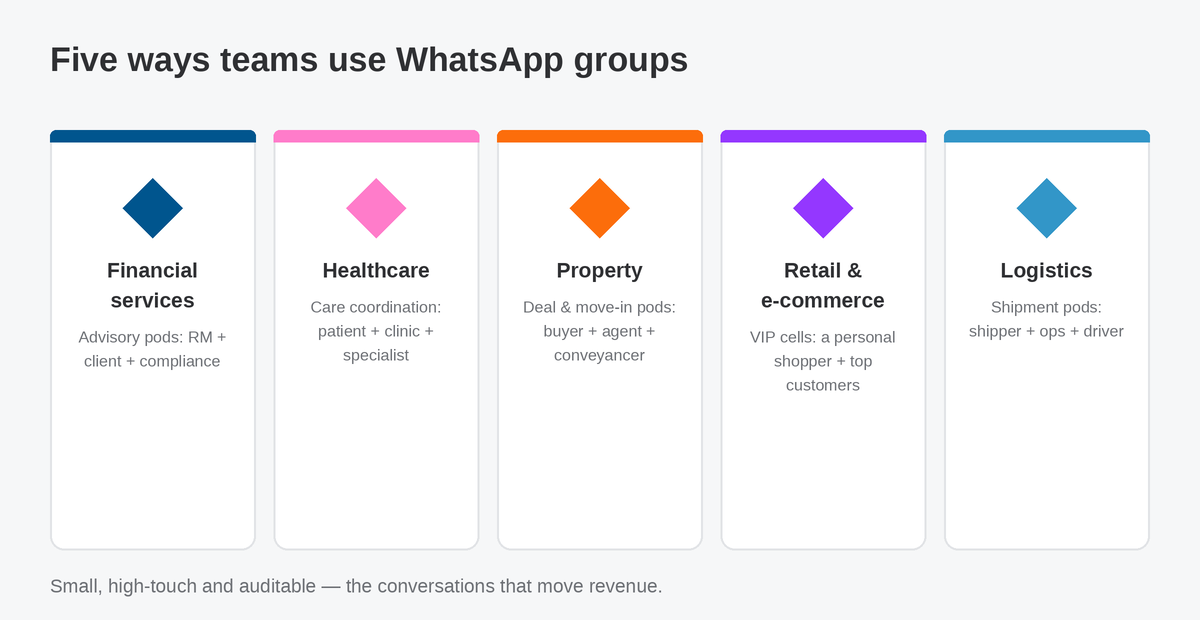
1. Financial services — advisory pods. Put a relationship manager, the client, and a compliance reviewer in one room for an onboarding, a mortgage, or a portfolio review. Every message is captured for the record, which matters when your regulator expects an audit trail. For finance teams this is where imBee’s ISO 27001-certified security earns its keep.
2. Healthcare — care coordination. A patient, the clinic coordinator, and a specialist coordinate appointments, pre-op instructions and follow-ups in a single thread. Invite-only joining gives you a clear consent record, and ISO 27001 controls keep sensitive exchanges protected.
3. Property — deal and move-in pods. A buyer or new tenant, the agent, and the conveyancer or property manager handle paperwork, keys and house rules together — far less lost in forwarded screenshots and scattered phone numbers.
4. Retail and e-commerce — VIP cells. A personal shopper hosts a handful of top customers for early drops, size holds and last-call alerts. Small, personal and high-converting — the opposite of a noisy broadcast list.
5. Logistics — shipment coordination. A shipper, the operations desk and the driver track a delivery in real time, with photos and quick replies, so exceptions are resolved in minutes instead of phone tag.
The common thread: faster resolution, fewer dropped conversations, and a record you can stand behind — without losing the personal feel of WhatsApp.
The raw Groups API is a capability. Turning it into something your customer-service, sales and compliance teams can run every day is where imBee comes in.
One unified inbox. Manage every WhatsApp group alongside your one-to-one WhatsApp chats, Instagram, Facebook Messenger, WeChat and SMS — in a single omnichannel inbox. No phone passed around the team, no conversation trapped on one agent’s device.
AI agents that follow your rules. imBee’s AI assistant, imBee AI, drafts and suggests replies grounded in your own company guidelines — not a generic chatbot. Inside a group, that means faster, on-brand, compliant responses while a human stays in control.
Automation that does the busywork. Auto-send invite links from your CRM when a ticket or deal opens, route and assign groups to the right agent, tag conversations, and trigger workflows on group events. imBee connects to the stack you already run.
Governance your compliance team will accept. Every exchange sits behind ISO 27001-certified controls with a full audit trail of who said what and when — essential for financial services and healthcare.
Scale without breaking the rules. Groups are for the high-touch few; pair them with imBee Broadcast and automation when you need to reach the many. Book a demo to see WhatsApp groups running in the imBee inbox.
Groups are powerful, but they are one tool of three. Here is how to choose:
| Tool | Best for | Audience size | Direction |
|---|---|---|---|
| WhatsApp Groups | Collaborative, high-touch coordination among a few named people | Up to 8 | Many-to-many in one room |
| WhatsApp Broadcast | Announcements, promotions and updates to a large list | Hundreds to thousands | One-to-many, private |
| One-to-one chat | Personal service, sales and support | One person | One-to-one |
A simple rule of thumb: if the people in the conversation need to hear each other, use a group. If they only need to hear from you, use Broadcast. If it is private and personal, keep it one-to-one. Many imBee customers use all three together — a broadcast drives interest, a group handles the high-value cohort, and one-to-one closes the deal.
What is the WhatsApp Groups API?
It is a 2026 addition to the WhatsApp Business Platform that lets an approved business create, manage and message small WhatsApp group chats programmatically. Groups hold up to 8 members who join by invite link, and businesses can pin messages, remove participants and receive webhooks for group events.
How many people can join a WhatsApp Business group?
Up to 8 members per group. The cap is deliberate: groups are designed for small, high-touch cohorts rather than mass messaging. A single business number can run up to 10,000 separate groups, so you can host many small rooms in parallel.
Who is eligible to use the WhatsApp Groups API?
Any business with an Official Business Account (OBA). It is not available on the consumer WhatsApp Business app or on Multi-solution Conversations. The widely repeated “100,000 conversations in 24 hours” requirement is a myth and is not in Meta’s documentation.
Is the Groups API the same as WhatsApp Channels or Broadcast?
No. Channels are public one-to-many follow feeds, and Broadcast sends a private message to many recipients individually. The Groups API is a shared room where up to 8 named participants see and reply to each other. Different tools for different jobs.
Can I send marketing messages to WhatsApp groups?
You can send approved text and media templates to a group, but groups are not built for mass marketing — the 8-member cap makes them a fit for VIP cohorts and personal service. For promotions to large audiences, use WhatsApp Broadcast instead.
Do members have to consent to join a group?
Yes. Members join only by tapping an invite link your business shares — there is no silent add. That opt-in gives you a clear consent record, and you can additionally require admin approval of join requests for sensitive groups.
How much does the WhatsApp Groups API cost?
Groups use per-message pricing and are charged per delivered recipient at the destination country’s rate, following standard WhatsApp Business pricing. Check Meta’s current pricing for your markets, and talk to your provider about how group messaging is billed on your plan.
How do I run WhatsApp groups with imBee?
imBee manages every group from one unified inbox, with AI agents that follow your guidelines, CRM-connected automation, and an ISO 27001-certified audit trail. Book a demo to see it in your own workflow.

Start your 30-day free trial today. Supercharge your team's productivity by over 30% and take your business to new heights of success.