

Why do Hong Kong businesses need WhatsApp auto-replies?
What auto-reply options does WhatsApp actually offer?
How do you set up auto-replies in the WhatsApp Business app?
How do API auto-replies work: keyword rules, routing and AI
6 copy-paste WhatsApp auto-reply templates for Hong Kong businesses
What makes a WhatsApp auto-reply compliant and effective in Hong Kong?
WhatsApp auto-reply for business: FAQ and next steps
WhatsApp is the default way Hong Kong customers reach a business: they message the number on your storefront, your Instagram bio or your Google listing, and they expect an answer in minutes, not days. That expectation does not pause at 6pm, on public holidays, or when a Typhoon Signal No. 8 empties the streets. Every unanswered hour is a live enquiry going cold or moving to a competitor who replied first.
An auto-reply is the cheapest service-level guarantee you can deploy. It confirms receipt instantly, tells the customer exactly when a human will respond, and can resolve routine questions - opening hours, delivery fees, appointment slots - before an agent ever touches the conversation. Done well, it is the difference between a missed sale and a booked one.
Key takeaways
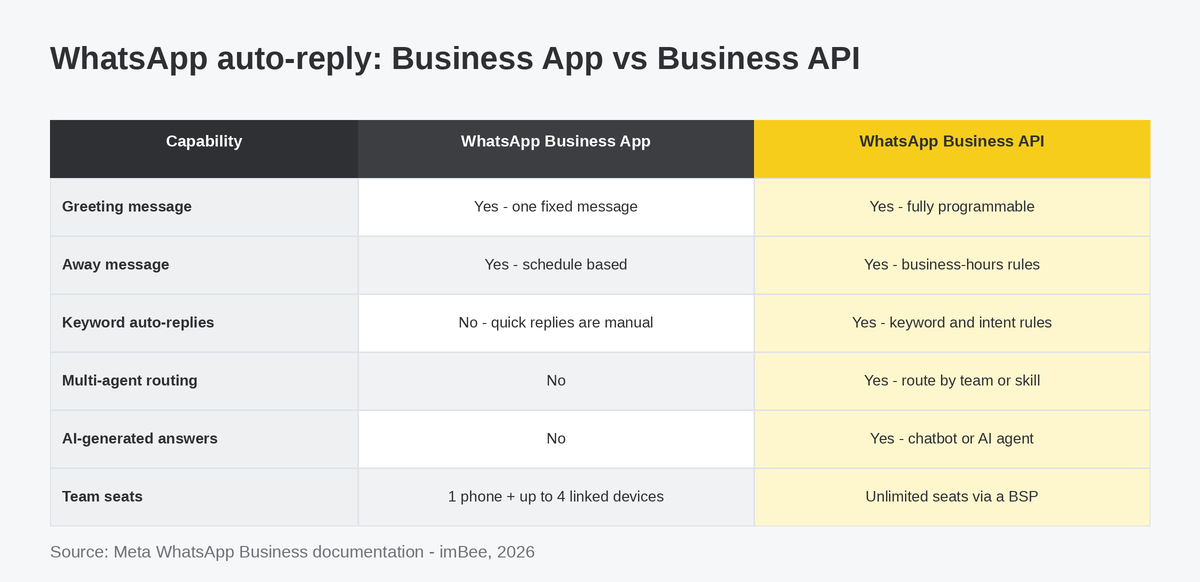
The WhatsApp Business app ships with three native automation features. A greeting message fires when a customer messages you for the first time or after 14 days of silence. An away message fires outside the schedule you set. Quick replies are canned answers your team inserts manually with the "/" shortcut - useful, but not automatic.
The WhatsApp Business Platform (API) is a different animal. Because the API hands every inbound message to your software, an auto-reply can be as intelligent as you make it: keyword and intent matching, business-hours logic, queue position updates, multi-agent routing and full chatbot journeys. Solutions like imBee sit on top of the API through a Business Solution Provider (BSP), so teams get this power without writing code. If you are still weighing the two routes, our guide to WhatsApp Business app vs API vs platform breaks down the decision.
| Capability | WhatsApp Business App (free) | WhatsApp Business API (via BSP) |
|---|---|---|
| Greeting message | Yes - one fixed message | Yes - fully programmable |
| Away message | Yes - schedule based | Yes - business-hours rules per team |
| Keyword auto-replies | No - quick replies are manual | Yes - keyword and intent rules |
| Multi-agent routing | No | Yes - route by team, skill or language |
| AI-generated answers | No | Yes - chatbot or AI agent |
| Team size | One phone plus up to four linked devices | Unlimited seats |
| Audit trail and analytics | Basic | Full conversation logs and response metrics |
The practical rule: if one person can genuinely answer every message within your promised window, the app is fine. The moment enquiries queue up - or more than one colleague needs the inbox - the API pays for itself.
Setting up the app's native auto-replies takes minutes. In the WhatsApp Business app, open Settings > Business tools, then:
Meta's WhatsApp Help Center documents each step, and the Meta Business Help Center covers profile-level settings like business hours. Two constraints matter in practice: each message type supports exactly one active text (no per-audience variants, no keyword triggers), and the app caps your team at one phone plus four linked devices. For a wider tour of what the free tier can do, see the 15 WhatsApp features every business should use.
If those limits feel comfortable, stop here and ship your two messages today. If they already pinch, the next section is for you.
On the WhatsApp Business API - whether the Cloud API directly or through a platform like imBee, an Official Meta Technology Partner - every inbound message triggers your logic. A well-built flow acknowledges the customer instantly, checks whether your team is on shift, answers routine questions with keyword or intent rules, and routes anything complex to a named team inbox. Nothing dead-ends.
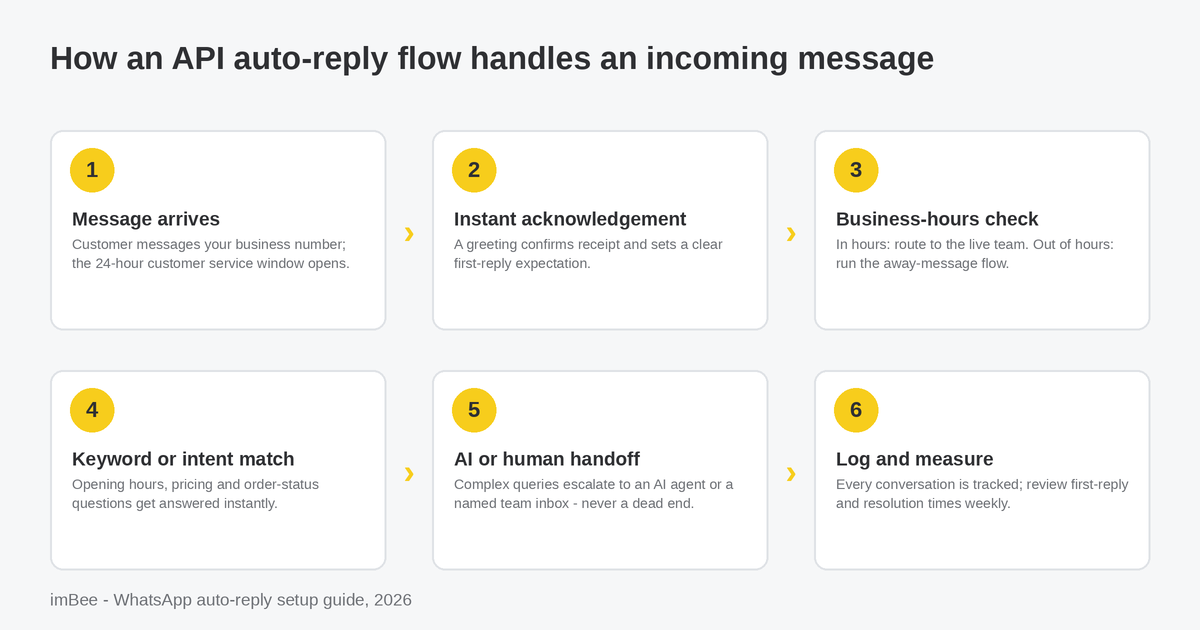
Two platform rules shape the design. First, an inbound customer message opens a 24-hour customer service window: inside it you may reply freely, including with automated session messages. Outside it, you can only re-open the conversation with a pre-approved message template, which Meta reviews and bills per delivered message. Your after-hours auto-reply should therefore invite the customer to expect a morning follow-up while the window is still open - a pattern we unpack in smart session handling for the 24-hour rule.
Second, automation should degrade gracefully into human hands. Keyword rules catch the predictable ("opening hours", "delivery", "price list"); an AI agent such as imBee's AI Agent handles long-tail questions grounded in your own product guidelines; and a live agent takes over the moment stakes rise. Striking that balance is a design choice, not an afterthought - our piece on balancing AI and human interaction covers where to draw the line.
Good auto-replies share three habits: they are short, they commit to a specific next step, and they never trap the customer with a robot. Here are six field-tested patterns to adapt.
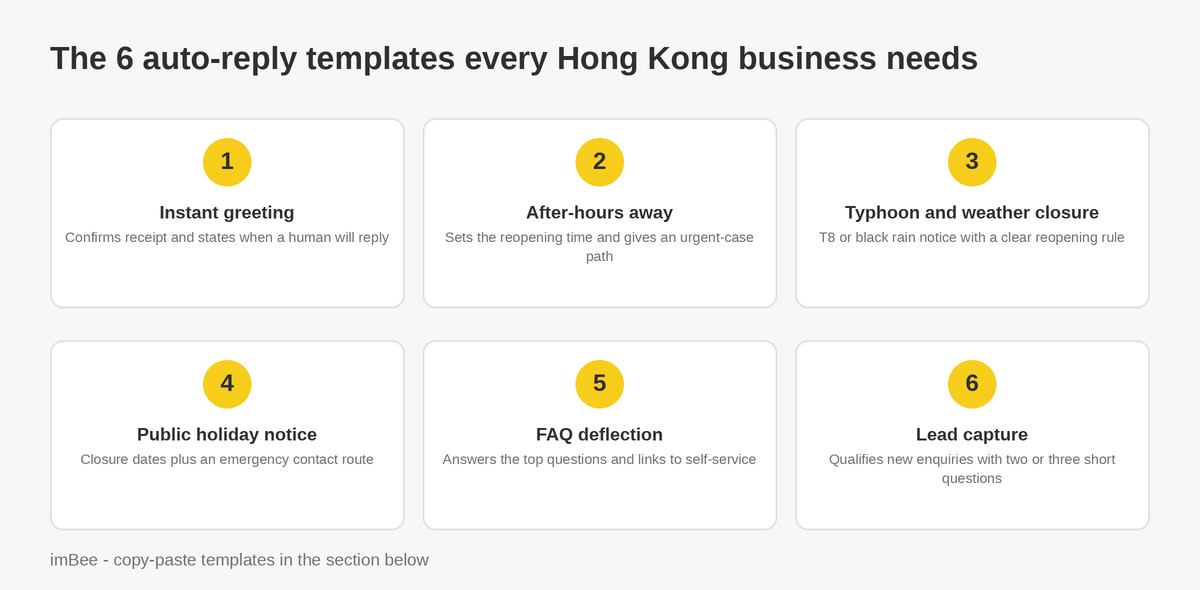
1. Instant greeting (during opening hours)
"Thanks for messaging [Business Name]! We have received your enquiry and a teammate will reply within [15 minutes]. Meanwhile, feel free to share photos or your order number so we can help faster."
2. After-hours away message
"We are offline right now. Our team is online Mon-Sat, 10:00-19:00, and yours will be the first message we answer tomorrow. Urgent? Call [phone] and leave a voicemail."
3. Typhoon and severe weather closure
"Due to Typhoon Signal No. 8, our shop is closed for safety. We reopen within two hours of the signal being lowered - check the Hong Kong Observatory for updates. Your message is saved and we will reply as soon as we are back." Swap in black rainstorm wording as needed; the Hong Kong Observatory is the canonical source your customers already trust.
4. Public holiday notice
"We are closed for the public holiday on [date] and back on [date] at [time]. Orders placed now will be processed on our first day back, in the order received." Hong Kong's general holidays calendar makes it easy to schedule these in advance.
5. FAQ deflection
"While you wait, quick answers: Opening hours: Mon-Sat 10:00-19:00. Delivery: 1-2 working days in Hong Kong. Returns: 14 days with receipt. Type AGENT at any time to reach a person."
6. Lead capture and qualification
"To speed things up, could you share: 1) your name, 2) what you are looking for, 3) the best time to call you back? A consultant will follow up within one business day." A clinic can swap in preferred appointment times, a brokerage its account-opening documents, a money lender its callback window, an NGO its donation-receipt details - the three-question skeleton stays the same.
One Hong Kong-specific habit: bilingual customers deserve bilingual automation. Pair each English line with its Traditional Chinese counterpart, for example: "We are offline right now / 我們暫時離線,營業時間為星期一至六 10:00-19:00,明早會優先回覆您。" If your audience skews Cantonese-first, lead with Chinese.
A service auto-reply - "we received your message, we reply at 9am" - is transactional, not marketing. But the moment your automation promotes an offer, it engages the direct-marketing provisions of Hong Kong's Personal Data (Privacy) Ordinance (Cap. 486): you need the customer's consent, and every marketing message needs a working opt-out. The PCPD publishes plain-language guidance, and its six Data Protection Principles govern how you collect and store the phone numbers and chat history your automation touches.
Regulated industries carry extra duties. Banks answer to HKMA expectations on customer communication records; brokerages sit under SFC record-keeping rules that make auditable, platform-level message logs non-negotiable. This is a core reason regulated teams run WhatsApp through an API platform with proper archiving - and why imBee maintains ISO/IEC 27001 certification for the infrastructure those logs live on.
Effectiveness, meanwhile, is about protecting two assets: your customer's patience and your number's standing with Meta. Automation that spams or traps users drives blocks and reports, which drag down your quality rating and can lead to messaging limits - we cover the mechanics in how to deal with blocks and bans on WhatsApp.
| Common mistake | What to do instead |
|---|---|
| Promising "we will reply soon" with no timeframe | Commit to a specific window ("within 15 minutes", "by 9:30am tomorrow") and staff to it |
| No route to a human | Always offer an escape word ("type AGENT") or a phone number |
| Marketing content in a service reply without consent | Keep service replies transactional; run promotions only to opted-in contacts with an opt-out line |
| Same message repeating on every inbound text | Throttle greetings (once per conversation) so threads do not fill with robot noise |
| Set-and-forget | Review first-reply time and resolution metrics weekly; retire templates that generate confusion |
In the WhatsApp Business app, go to Settings > Business tools, then enable a greeting message for new contacts and an away message on your off-hours schedule. That is the entire free setup. For keyword-triggered replies, routing or AI answers, you need the WhatsApp Business API through a provider platform.
An away message is one kind of auto-reply: a fixed text sent outside business hours. Auto-reply is the umbrella term for any automatic response, including greetings. A chatbot goes further - it reads what the customer wrote and responds differently by keyword or intent, which requires the API rather than the free app.
Inside 24 hours of the customer's last message you may reply freely, including automatically. After the window closes, Meta only allows pre-approved template messages, billed per delivered message. Well-designed flows answer immediately while the window is open, then use templates sparingly for genuine follow-ups.
Yes. A transactional acknowledgement is not direct marketing, so no marketing consent is needed. If the automated message promotes products or offers, PDPO (Cap. 486) direct-marketing rules apply: you need prior consent and must honour opt-outs. Store chat data in line with the PCPD's Data Protection Principles.
Yes, and in Hong Kong they usually should be. The simplest pattern is one message with both languages, English and Traditional Chinese, ordered by your customer base. On the API you can go further and route by the customer's detected language or stated preference, keeping every reply single-language and clean.
Helpful automation does not; annoying automation does. Quality rating reflects blocks and reports from recipients. Keep automated messages expected, infrequent and easy to escape, and never use automation to push marketing at people who did not opt in. Watch your rating in WhatsApp Manager as volume grows.
Treat minutes as the unit, not hours. Customers message the way they message friends and expect similar speed. An instant automated acknowledgement buys your team breathing room, but the human follow-up should land within the window you promised - which is why the promise must be one you can staff.
Three reliable signals: more than one colleague needs the inbox, enquiries regularly arrive faster than one person can answer, or compliance requires audit-ready message records. At that point a platform on the API gives you routing, keyword automation, AI agents and analytics without changing your number.
imBee helps Hong Kong teams run WhatsApp, WeChat, Instagram and more from one governed inbox - with auto-reply flows, AI agents and the audit trail regulated industries need. Talk to our team to see it on your own use cases.
Discuss your channels, team and conversation handover needs in a product demo.


